
Learning Objectives
- Learn about the black keys on the piano.
- Examine the role of accidentals (sharps, flats, and naturals) in music.
The Keyboard V: Accidentals
Accidentals
The black keys on the keyboard are named according to how they modify the white-key pitches on either side of them, raising or lowering these pitches with accidentals. The keyboard example below illustrates that each black key can be identified by two different names. They may be labeled using either sharps or flats. For example, the first black key here is labeled "C-sharp" (C#) and "D-flat" (D♭). On the top left of the keyboard, you can press the "#" button to see only the sharp names, the "♭" button to see only flat names, or “Both” to see the sharp and flat name that applies to a given black key. As will shall see in subsequent lessons, white keys may also be labeled using sharps and flats.
Enharmonic Accidentals
Sharps

The adjacent black key to the right of a white key produces a pitch that is a half step higher than the original pitch, and is called a sharp. For example, play the combination D to D# on the keyboard above by playing a D, followed by the black key to the right of that D. Listen carefully to the half-step difference between the two sounds. A sharp raises the pitch of any note by a half step, as illustrated in the example below.
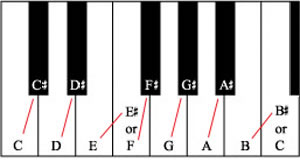
Flats

The adjacent black key to left of a white key produces a pitch that is a half step lower than the original pitch, and is called a flat. For example, if you play an E on the keyboard above, followed by the black key to the left of that E, you will have played the combination E to E♭. Again, listen carefully to the half-step difference between the two sounds. A flat lowers the pitch of any note by a half step, as illustrated in the example below.
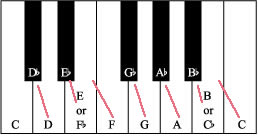
White Keys As Accidentals
White keys can also be labeled sharp or flat. Notice that there are two places in the keyboard where adjacent white keys don't have a black key between them. These two places are B to C, and E to F. Because there is no black key between them, the distance between those two white keys is a half-step. These white keys modify each other by half-step (up or down) and, therefore, can also be labeled sharp or flat depending on the white key they modify. Let's analyze in more detail the cases when white keys can be labeled sharp or flat.
B is adjacent to C with no black key between them, which means that C is half-step higher than B. Therefore, we can say that C modifies B upwards by half-step. Consequently, C can be labeled B#. In turn, B is half-step lower than C (no black key between them), and can be said to modify C downwards by half-step. Consequently, B can be labeled C♭.
E is adjacent to F with no black key between them, which means that F is half-step higher than E. Therefore, we can say that F modifies E upwards by half-step. Consequently, F can be labeled E#. In turn, E is half-step lower than F (no black key between them), and can be said to modify F downwards by half-step. Consequently, E can be labeled F♭.
Revisit the sharps and flats diagrams above to reinforce these concepts.
Naturals

The natural sign cancels any accidentals they were previously applied to a note. A note that is neither sharp nor flat is natural. For example, a "G natural" (as opposed to a G# or a G♭) is a white-note G on the keyboard, as illustrated in the example below. We will return to the topic of naturals after introducing the musical staff.
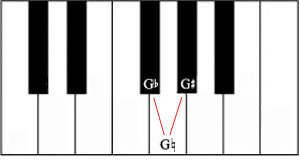
Summary
| Remember |
|
Use the interactive example below to practice playing and identifying the notes on the keyboard. Try to name the keys that you play before you play them—the correct name will be displayed when you press and hold the key (for black keys, both the sharp name and the flat name will be displayed).
Enharmonic Pitches
| Notes on the keyboard |